



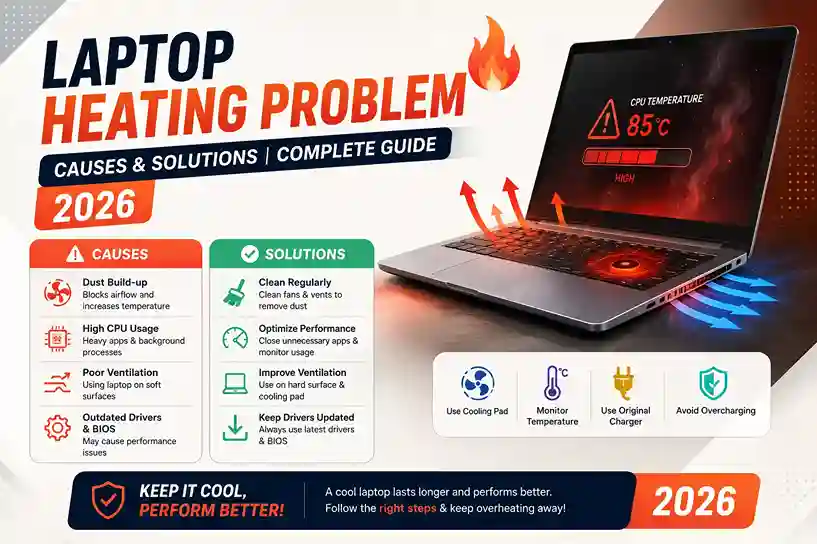
Laptop heating is one of the most common problems faced by students, gamers, freelancers, programmers, and office users in Pakistan. Many people search on Google for laptop overheating problem, why my laptop gets hot, how to reduce laptop heat, laptop heating solution, and best cooling pad for laptop.
A laptop getting slightly warm is normal, but excessive heating can slow down performance, damage hardware, reduce battery life, and even cause automatic shutdowns.
In this detailed guide, we will explain the main causes of laptop heating problems, effective solutions, and tips to keep your laptop cool and fast in 2026.
Why Do Laptops Heat Up?
Laptops generate heat because components like:
- Processor (CPU)
- Graphics card (GPU)
- RAM
- SSD/HDD
…work continuously while running applications.
Modern laptops are compact, so airflow is limited compared to desktop PCs. This makes cooling more difficult.
Common Signs of Laptop Overheating
Here are some common signs:
✔ Laptop becomes very hot
✔ Fan noise becomes loud
✔ Slow performance
✔ Sudden lagging
✔ Battery drains quickly
✔ Automatic restart/shutdown
✔ Keyboard area becomes hot
👉 Highly searched keyword:
how to know if laptop is overheating
Main Causes of Laptop Heating Problem
1. Dust Inside Cooling Fan
This is the most common cause in Pakistan.
Dust blocks airflow and prevents proper cooling.
Result:
❌ Fan works harder
❌ Heat stays trapped inside
2. Heavy Software & Multitasking
Running heavy applications like:
- Games
- Video editing software
- Android Studio
- Multiple Chrome tabs
…puts pressure on CPU and RAM.
This increases temperature quickly.
👉 Search keyword:
laptop overheating while gaming
3. Poor Ventilation
Using laptop on:
- Bed
- Pillow
- Blanket
…blocks air vents.
This traps heat inside the laptop.
4. Old Thermal Paste
Thermal paste transfers heat from processor to cooling system.
After years of use:
- Thermal paste dries out
- Cooling efficiency decreases
Result:
❌ Higher CPU temperature
5. Faulty Cooling Fan
If cooling fan stops working properly:
- Heat cannot escape
- Laptop temperature rises rapidly
6. Background Apps & Viruses
Some apps use CPU continuously in background.
Malware and viruses can also increase CPU usage.
This leads to overheating.
7. High Room Temperature
Pakistan’s summer weather also affects laptop temperatures.
Using laptop in:
- Hot rooms
- Poor ventilation
…increases heating problems.
Best Solutions for Laptop Heating Problem
1. Clean Your Laptop Regularly
Dust cleaning is very important.
Recommended:
- Clean fan every 6–12 months
This improves airflow and cooling.
👉 Trending keyword:
how to clean laptop fan
2. Use a Laptop Cooling Pad
Cooling pads improve airflow under laptop.
Benefits:
✔ Lower temperature
✔ Better airflow
✔ Improved gaming performance
Especially useful for:
- Gamers
- Freelancers
- Video editors
👉 Popular keyword:
best cooling pad for laptop Pakistan
3. Avoid Soft Surfaces
Always use laptop on:
✔ Table
✔ Desk
✔ Laptop stand
Avoid beds and cushions.
4. Close Unnecessary Applications
Too many background apps increase CPU usage.
Tips:
- Close unused Chrome tabs
- Stop unnecessary startup apps
- Monitor Task Manager usage
5. Replace Thermal Paste
If laptop is old (2–4 years), replacing thermal paste can reduce temperatures significantly.
This should be done by a technician.
6. Update Drivers & Windows
Old drivers can cause performance and heating issues.
Keep updated:
- BIOS
- GPU drivers
- Windows updates
7. Use Antivirus Software
Viruses and malware can overload CPU usage.
A good antivirus helps maintain performance.
Why Gaming Laptops Heat More
Gaming laptops contain:
- Powerful GPU
- High-performance CPU
- RGB systems
These components naturally produce more heat.
That’s why gamers often search:
- gaming laptop heating problem
- how to cool gaming laptop
How to Reduce Laptop Temperature While Gaming
✔ Lower graphics settings
✔ Use cooling pad
✔ Limit background apps
✔ Keep laptop plugged in properly
✔ Play in cool environment
Best Accessories to Prevent Laptop Heating
Cooling Pad
Improves airflow.
Laptop Stand
Raises laptop for better ventilation.
External Cooling Fan
Provides additional cooling.
UPS / Stable Power
Protects from voltage issues.
Laptop Heating vs Desktop Heating
| Feature | Laptop | Desktop |
|---|---|---|
| Cooling Space | Limited | Better airflow |
| Heating Issue | More common | Less common |
| Upgrade Cooling | Limited | Easy |
| Fan Size | Smaller | Larger |
Desktops usually handle heat better due to larger cooling systems.
Best Cooling Accessories in Pakistan
If you want original laptop accessories and cooling solutions, buy from a trusted supplier.
HCOM Distributors provides:
- Cooling pads
- Laptop stands
- External accessories
- Gaming accessories
- SSD upgrades
- Business laptops
Suitable for:
- Students
- Gamers
- Freelancers
- Office users
Visit:
hcomdistributors.pk
Final Words
Laptop heating is common, but ignoring it can damage your device and reduce performance.
The best ways to prevent overheating are:
✔ Regular cleaning
✔ Using cooling pad
✔ Proper ventilation
✔ Reducing heavy background usage
If your laptop gets extremely hot frequently, it may need:
- Fan cleaning
- Thermal paste replacement
- Hardware servicing
Taking care of your laptop improves performance, lifespan, and user experience.
Ranking Keywords: laptop heating problem, laptop overheating solution, why laptop gets hot, how to reduce laptop heat, laptop overheating while gaming, best cooling pad for laptop, laptop fan problem, gaming laptop heating issue, how to cool laptop, laptop temperature solution

